

دليل المستخدم
Reports
Reports shows what the books say, as charts and tables you can download. Every amount comes from the ledger.
الدليل بالعربية قادم قريبًا. إلى أن يصدر، تجدون أدناه الدليل بالإنجليزية.
المحتويات
What you can do here:
| Task | Who |
|---|---|
| Read a report | Principal, Administrator, Accountant: all eight. Maintenance manager: Occupancy, Rent roll, Leases ending and Maintenance cost |
| Filter it, switch chart and table, download it | The same |
| Save a view | The same |
The leasing agent, collector and technician don't see Reports.
The reports
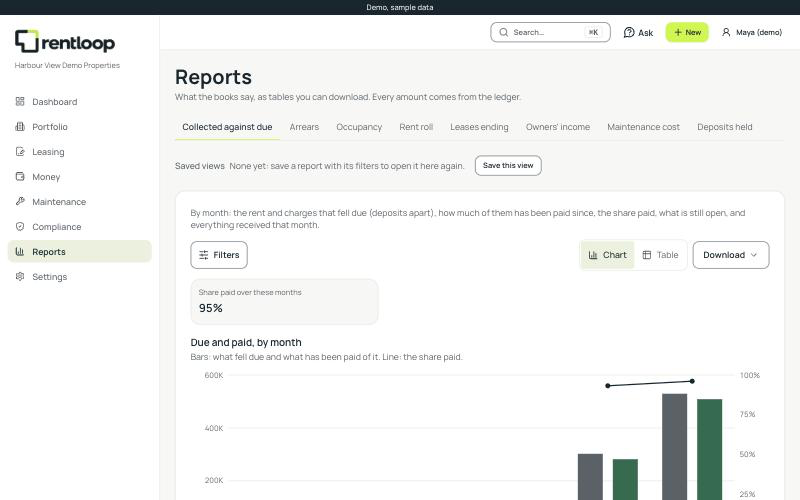
Choose a report from the tabs at the top.
| Report | What it shows |
|---|---|
| Collected against due | By month: the rent and charges that fell due (deposits apart), how much of them has been paid since, the share paid, what is still open, and everything received that month |
| Arrears | What each tenant owes now on each lease, by how long it has been due: current (due today, not yet late), 1–30, 31–60, 61–90 and over 90 days |
| Occupancy | How much of the time units were let, month by month, and how long they stood vacant; the units vacant now, longest first; then the pipeline: enquiries by property, how many were shown a unit, offered one, and became a lease |
| Rent roll | Every unit, and its current lease if it is let: the tenant, the rent for that unit, the dates, the deposit held and what it owes |
| Leases ending | Leases whose last day is coming, and what each comes to: renewed, under notice, or not yet decided |
| Owners' income | Each owner's money over the period, as their statements count it: brought forward, collected, expenses, fees, payouts and carried forward; then month by month |
| Maintenance cost | What maintenance cost over the period, by month, property and kind of work, and how long requests took to close |
| Deposits held | The deposits the office holds, by property and lease |
The dashboard's cards open these reports: Collected, Arrears, Rent roll and Leases ending.

Filter, switch and download
Filters narrows a report: the dates, a property, an owner and so on, depending on the report. Some reports also have a search box.
Chart and Table switch between the two views.
Download gives the report as a PDF or a CSV file to open in Excel.
Saved views
Save a report with its filters to open it again in one click.
Set the report and its filters.
Click Save this view, give it a name, and click Save.
Saved views appear under Saved views at the top of every report. They are saved for you only, up to 20. A name already used is replaced.